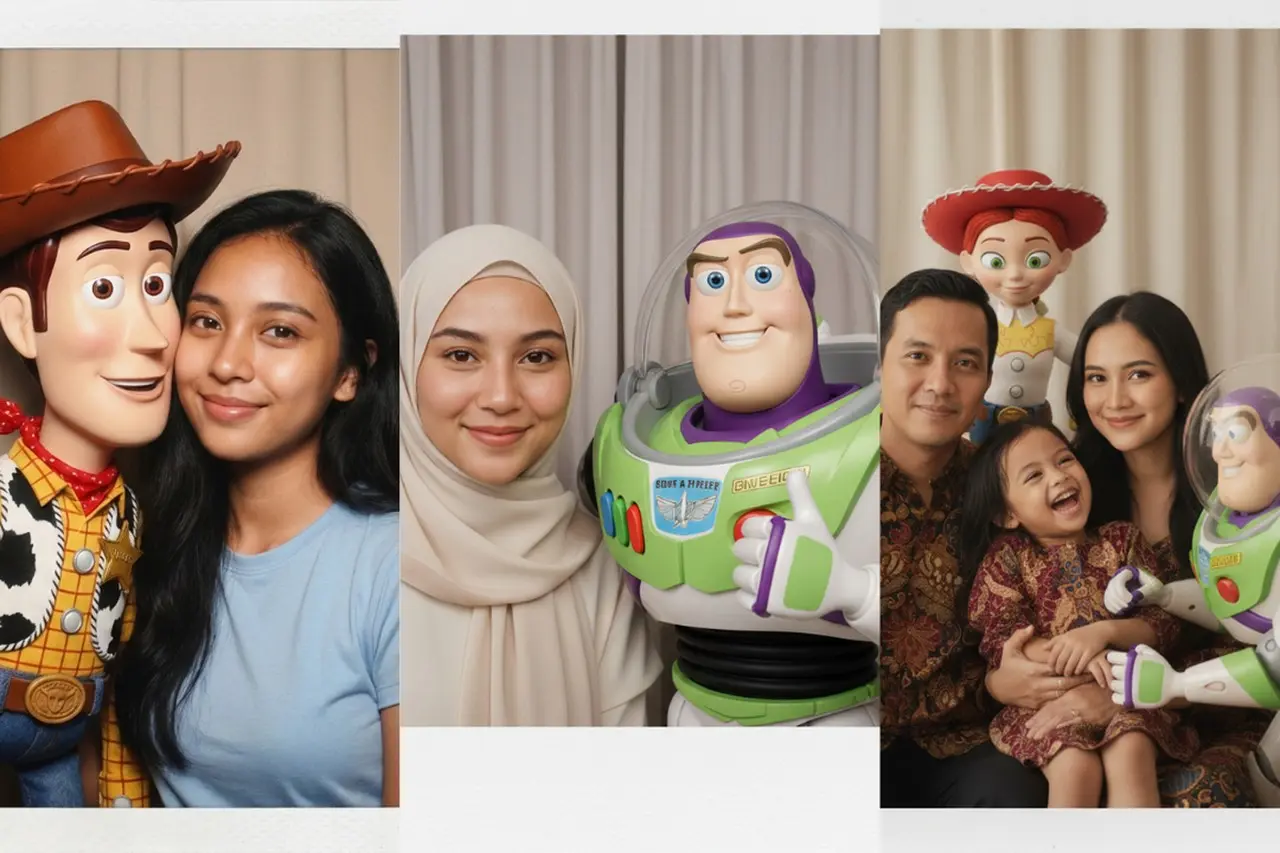
Belakangan ini, linimasa media sosial diramaikan oleh sebuah tren unik: mengedit foto pribadi seolah berpose bersama karakter ikonik Pixar dari film Toy Story. Fenomena ini memungkinkan pengguna menghadirkan Woody, Buzz Lightyear, atau Jessie ke dalam foto asli mereka dengan bantuan generator gambar AI seperti Gemini dan ChatGPT.
Fenomena Edit Foto AI: Realisme dan Kreativitas
Tren ini menarik perhatian karena tidak mengubah wajah pengguna menjadi kartun, melainkan secara cerdik mengintegrasikan karakter Toy Story ke dalam foto asli. Hasilnya terlihat natural, sebab AI mempertahankan detail wajah, pakaian, dan proporsi tubuh asli pengguna, sementara karakter pendamping tampil dengan gaya visual 3D khas film aslinya.
Panduan Praktis Menggunakan Prompt AI
Untuk mengikuti tren ini, pengguna hanya perlu memilih foto dengan pencahayaan yang cukup dan wajah yang terlihat jelas, lalu mengunggahnya ke platform AI yang mendukung fitur unggah gambar seperti Gemini atau ChatGPT. Selanjutnya, pilih dan salin instruksi (prompt) yang sesuai dengan jenis foto Anda. Berikut adalah beberapa prompt yang dapat dicoba:
-
1. Prompt AI untuk Foto Solo Perempuan Tidak Berhijab:
“Take the uploaded photo and create a photobooth-style edit where the person is posing with one character from Pixar’s Toy Story. Keep the person completely unchanged in facial features, body proportions, skin tone, and outfit details. Analyze the dominant color of the outfit worn by the person, then automatically select the Toy Story character whose original movie outfit color matches best, such as Woody for denim or red accents, Buzz Lightyear for green, white, or purple tones, Jessie for yellow elements, or Lotso for pink shades. Do not recolor or redesign any Toy Story character, preserve their authentic Pixar 3D design, proportions, textures, and colors exactly as seen in the movie. Place the character beside the person in a friendly photobooth pose, such as standing close, leaning in, or giving a playful hug. Use a simple photobooth background with a plain curtain or solid neutral color, soft flash lighting, centered framing, and optional instant-film or Polaroid-style borders with subtle grain. The final output should be a high-resolution, realistic photobooth-style image that looks like an official crossover photo between a real person and a Toy Story character.”
-
2. Prompt Foto Solo Berhijab:
“Take the uploaded photo and generate a photobooth-style image featuring the hijab-wearing subject posing together with one character from Pixar’s Toy Story. Preserve the subject exactly as they appear, including facial structure, skin tone, hijab shape, fabric folds, outfit details, and body proportions. Analyze the dominant color of the subject’s clothing or hijab and select the Toy Story character whose original color palette best matches, such as Buzz Lightyear for white or green tones, Jessie for yellow accents, Woody for denim or brown outfits, or Bo Peep for soft pastel colors. Maintain the Toy Story character’s original Pixar 3D style with no recoloring or redesign. Position the character next to the subject in a friendly photobooth pose, such as standing side by side, slightly leaning, or posing cheerfully as if taking a snapshot together. Use a clean photobooth background with soft lighting, neutral curtains, centered composition, and optional Polaroid-style borders with light film grain for realism. The final image should appear natural, warm, and visually cohesive.”
-
3. Prompt Foto Solo Laki-laki:
“Use the uploaded photo and create a realistic photobooth-style edit of the male subject posing naturally with a Pixar Toy Story character. Keep the man completely unchanged, preserving facial features, hairstyle, outfit, skin tone, body proportions, and overall posture. Determine the dominant color of the outfit and automatically select the Toy Story character whose original movie color scheme matches best, such as Woody for denim or brown tones, Buzz Lightyear for green, white, or purple outfits, Zurg for black clothing, or Hamm for red or pink accents. Do not alter or recolor any Toy Story character; use their authentic Pixar 3D design exactly as in the films. Arrange the pose to feel candid and relaxed, as if captured mid-moment in a photobooth. The Toy Story character may slightly lean toward the man, stand at a casual angle, gesture playfully, or pose with friendly body language (such as a subtle wave, relaxed stance, or cheerful interaction), avoiding stiff or symmetrical posing. Ensure the interaction feels spontaneous, fun, and warm rather than posed or formal. Apply a simple neutral photobooth background, soft flash lighting with gentle shadows, centered framing, and an optional instant-film border with light grain. The final image should look like a genuine, candid photobooth photo taken with a Toy Story character.”
-
4. Prompt Foto Couple:
“Take the uploaded couple photo and transform it into a photobooth-style image where both people are posing together with one or two Pixar Toy Story characters. Keep both individuals unchanged in facial features, body shape, skin tone, outfits, and expressions. Analyze the dominant colors of each person’s outfit and choose Toy Story characters whose original color palettes best complement those colors, without recoloring or redesigning the characters. Use authentic Pixar 3D styles with accurate proportions, textures, and colors. Position the couple standing close together, while the Toy Story character(s) pose naturally beside or slightly behind them, as if taking a fun group photo in a photobooth. Use a plain curtain or neutral backdrop, soft flash lighting, balanced composition, and optional Polaroid-style borders with subtle grain. The final output should be a high-resolution, warm, and playful photobooth-style couple image.”
-
5. Prompt Foto Keluarga:
“Use the uploaded family photo and create a photobooth-style scene featuring all family members posing together with one or more Pixar Toy Story characters. Preserve every family member exactly as they appear, including facial features, body proportions, skin tones, outfits, hijabs (if any), and accessories. Analyze the dominant colors across the family’s outfits and select Toy Story characters whose original movie color palettes best match, ensuring all characters remain in their authentic Pixar 3D design with no recoloring or redesign. Arrange the family in a natural group pose, with the Toy Story characters standing, leaning, or playfully interacting beside them, as if captured in a cheerful photobooth snapshot. Use a simple neutral background, soft flash lighting, centered framing, and optional instant-film or Polaroid-style borders with light grain. The final image should feel warm, fun, and suitable as a family keepsake photo.”
Tips untuk Hasil Foto Maksimal
Agar hasil edit foto lebih maksimal, ada beberapa tips yang bisa diterapkan:
-
Pastikan foto awal tidak buram agar AI dapat mengenali detail wajah dan warna baju dengan tepat.
-
Gunakan latar belakang foto yang simpel, seperti tembok polos, untuk memudahkan AI menyatukan objek dengan karakter tambahan.
-
Pilih pakaian dengan warna yang kontras atau solid agar AI lebih cerdas dalam memilihkan karakter pendamping yang sesuai, misalnya baju hijau untuk Buzz Lightyear atau cokelat untuk Woody.
Dengan panduan prompt AI ini, pengguna kini dapat memiliki koleksi foto unik bersama karakter favorit masa kecil tanpa memerlukan keahlian desain grafis. Informasi mengenai tren dan panduan penggunaan prompt AI ini dirilis pada Minggu, 01 Februari 2026.